What to Look for in a SearchSEO Alternative CTR Tool
You have a shortlist of CTR tools and no way to tell which ones actually deliver what they promise. Some platforms bill for visits you cannot verify, and a failed visit can still eat your credits. This article gives you a checklist for judging a SearchSEO alternative, covering screenshot proof, platform coverage across Google, Bing, Maps and AI Overviews, campaign controls for desktop and mobile, and credit billing. You will also see how CTRTool measures up against each criterion and decide whether it fits your campaigns.
What Is CTRTool? The CTR Campaign Tool Behind the Checklist
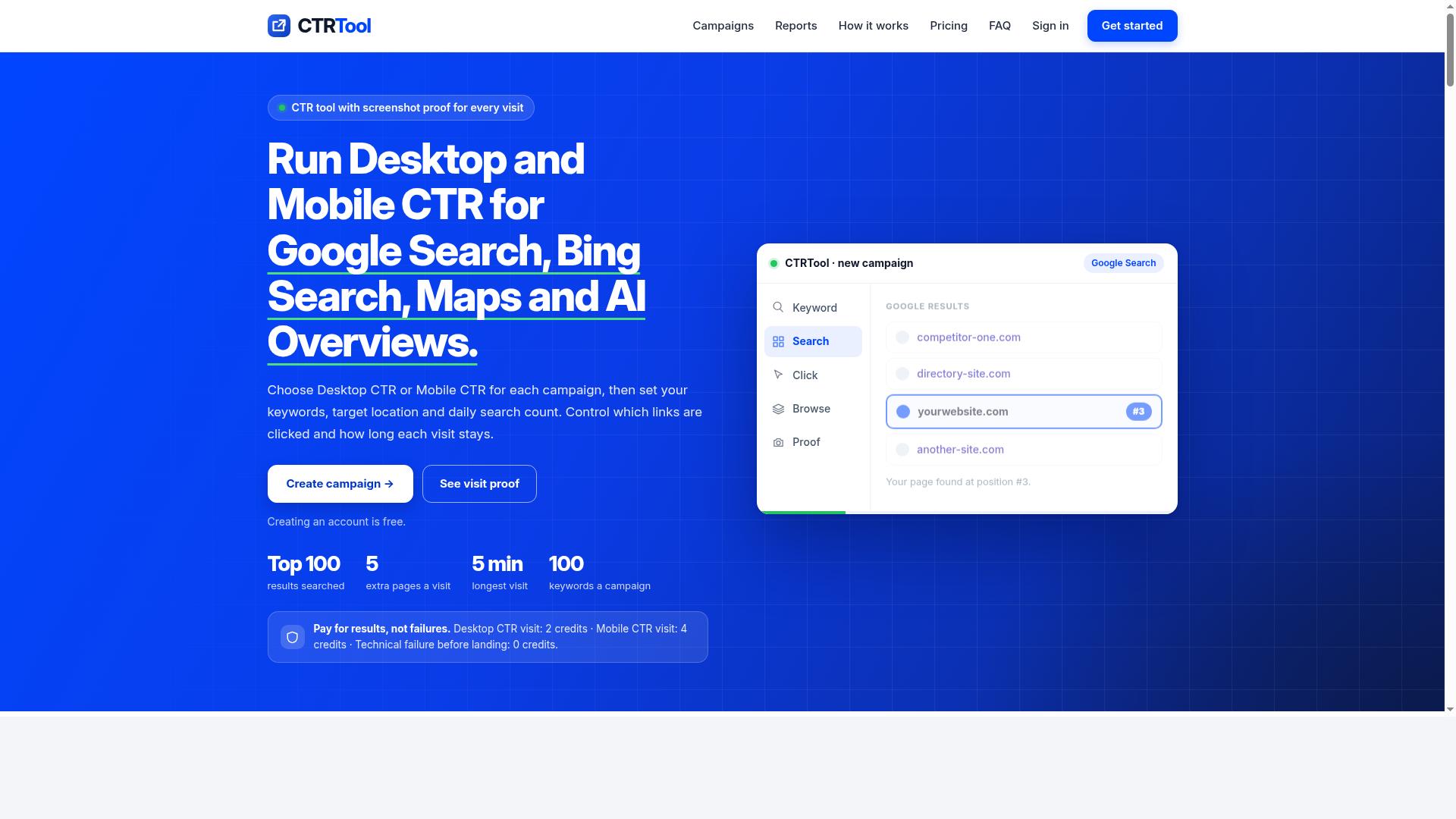
CTRTool is a SaaS platform that runs desktop and mobile CTR campaigns for Google Search, Bing Search, Maps, and AI Overviews, with screenshot proof for every visit. It exists to help improve click-through rate and search visibility by automating clicks from real users.
Campaign setup is built around control. Users choose Desktop CTR or Mobile CTR per campaign, then set keywords, target location and daily search count. They also decide which links get clicked and how long each visit stays.
This makes CTRTool a direct search SEO alternative to SearchSEO, and it is the tool the checklist in this article is built around. One point deserves emphasis up front: the site itself states that automated visits do not guarantee rankings. Keep that in mind as you read the full review that follows.
Essential Criteria for Choosing a SearchSEO Alternative CTR Tool
When evaluating a SearchSEO alternative, focus on four critical factors: verifiable proof of visits, platform coverage, campaign control, and fair billing practices.
These criteria separate tools that deliver measurable value from those that simply report activity. Each one addresses a different risk: unverified traffic, blind spots in search visibility, limited campaign flexibility, and wasted spend.
The sections below break down each factor so you can compare options on substance rather than marketing claims.
Proof of Every Visit: Screenshots and Full Visit Paths
Without verifiable proof, a CTR tool's visits are just numbers; demand screenshots of the search result and landing page, plus the full path taken by each visitor.
Proof matters because it confirms two things: that visits are real, and that they originate from the target keyword and location rather than from unrelated sources. A screenshot of the search query and result page shows the visit started where it should have. A landing page screenshot confirms the visitor arrived at the intended destination.
The complete visit path ties these together, showing the journey from search to landing page. Crucially, this evidence should be available per visit, not just as an aggregated summary. A total count with no individual records gives you nothing to audit.
When auditing proof, check a sample of visits against these details:
- Timestamps that match your campaign schedule and daily limits
- Device type consistent with the desktop or mobile segment you targeted
- Keyword position showing the result was found in a realistic ranking location
- Query and location matching the exact keyword and geo-target you set
Inconsistent or missing proof is one of the clearest warning signs in this category. Treat per-visit evidence as a baseline requirement, not a premium feature.
Platform Coverage: Google Search, Bing, Maps and AI Overviews
A robust CTR tool should cover the platforms where your audience searches: Google Search, Bing Search, Google Maps, and increasingly AI Overviews.
Each platform serves a different search behavior, and a gap in coverage limits where you can build search visibility. Google Search covers organic results and is the core of most campaigns. Bing Search reaches a distinct audience and is often overlooked, which can mean less competition for the same keywords.
Google Maps matters for local pack listings, where proximity and location settings drive what users see. AI Overviews are newer territory: citations inside AI-generated answers are becoming part of how visibility is earned, and tools that ignore them leave that surface unaddressed.
For each platform, check the practical settings before committing:
- Keyword eligibility: for example, whether a tool supports keywords ranking in the top 100 results for search, or top 50 listings for Maps
- Device targeting: whether desktop and mobile are available per platform
- Location settings: whether you can match the country or city your audience actually searches from
Compare breadth against your goals. A national brand may prioritize search coverage, while a local business should confirm Maps support before anything else.
Campaign Control: Desktop vs Mobile, Keywords, Location and Daily Counts
Effective CTR campaigns require granular control: choose desktop or mobile per campaign, select keywords, set target locations, and define daily visit counts.
Device segmentation is the first lever. Desktop and mobile visitors behave differently, and many tools charge separate credit costs for each. Running them as distinct campaigns lets you match spend to where your audience converts and measure desktop CTR against mobile CTR honestly.
Keyword selection shapes intent. Head terms bring volume and broad relevance, while long-tail keywords reach narrower, often higher-intent audiences. Decide whether a campaign targets branded or non-branded queries, since mixing them muddies your results.
Location targeting should scale from country to state to city, with an any-country option for broad tests. A local SEO campaign should concentrate on a city or region, while a national push spreads across markets. Daily visit counts help pace visits naturally instead of concentrating them in bursts, which looks more organic and keeps budgets predictable.
Structure campaigns around a single goal. For local visibility, pair city-level geo-targeting with Maps keywords and modest daily counts. For national reach, segment devices and split head terms from long-tail lists so you can read performance per group. These controls determine whether your budget produces useful data or just activity.
Fair Billing: Credit Models and What Happens When a Visit Fails
A fair CTR tool only charges for successful visits; understand the credit model, what constitutes a failed visit, and whether credits are refunded. This is one of the most practical ways to judge whether a search SEO alternative treats its users honestly. Billing clarity separates tools built for long-term campaigns from those that quietly drain your balance.
Most CTR tools work on a credit system where each credit maps to a single visit to your target page. Before you commit, confirm exactly how many credits a visit costs and whether that rate changes by device or location. A tool that charges the same for a desktop visit and a mobile visit is easier to budget than one with variable rates.
Credit consumption is rarely uniform. Many platforms charge different amounts depending on how the visit is delivered. Look for a clear published rate card rather than vague promises.
- Desktop visits are often the baseline, with one credit equal to one visit.
- Mobile visits may cost more or the same, depending on how the tool sources traffic.
- Geo-targeted visits from specific countries can carry a premium or a discount.
- Device segmentation matters if your campaign needs tablet traffic or a mobile CTR push.
Ask for the per-visit rate in writing before you fund an account. If a provider cannot explain its credit mapping in plain terms, that is a warning sign. Transparency here is the foundation of fair billing.
Failed visits are where billing models diverge most. A visit can fail for several reasons, and each tool handles them differently.
- The keyword is not found in the expected position or page.
- The location does not match the geo-targeting you requested.
- The session drops before the page fully loads.
- The visit is flagged as invalid by the tool's own quality checks.
The key question is simple: are failed visits refunded, not charged, or silently deducted? A fair model only bills for completed, verified sessions. A less scrupulous model may count attempts as visits, leaving you paying for traffic that never reached your page.
Check the terms of service for the word "attempt" versus "completed visit." That single distinction often reveals how a provider really bills.
Comparing credit models across tools takes a little arithmetic but pays off quickly. Build a simple table of what each platform charges per visit, per device type, and per country. Then note its failure policy and refund terms side by side.
| Factor to Compare | What to Look For |
|---|---|
| Cost per visit | Flat rate versus variable by device or geo |
| Failed visit policy | Refunded, not charged, or deducted anyway |
| Minimum purchase | Small top-ups versus large upfront bundles |
| Credit expiry | No expiry versus time-limited balances |
A tool with a slightly higher per-visit rate but a strict no-charge-on-failure policy can cost less overall than a cheap tool that bills for misses. Compare effective cost, not headline price.
Estimating monthly credit needs keeps your campaign predictable. Start with your target visit volume, then adjust for device mix and geo-targeting.
- Count the keyword ranking positions you want to support and the visits each needs per day.
- Multiply by 30 to get a monthly baseline.
- Add a buffer for geo-targeted or mobile visits that cost more.
- Factor in a small reserve for retries if failed visits are not refunded.
If you run campaigns across several countries, track credit use per region so a single expensive geo does not quietly consume your whole balance. A transparent provider will show you consumption by campaign, device, and location.
Finally, revisit your estimate after the first month. Real usage data beats any forecast, and a fair billing model should make those numbers easy to read at a glance.
How CTRTool Measures Up Against Those Criteria
CTRTool addresses the four criteria with screenshot proof for every visit, multi-platform coverage, granular campaign controls, and a credit-based billing system. Each of those areas maps directly onto the checks a careful buyer should run before committing to any search SEO alternative.
The two subsections below detail the proof mechanisms and the campaign types, so you can see exactly what the tool delivers and where its eligibility boundaries sit.
Screenshot Proof and Keyword Position Tracking
CTRTool provides separate search and landing screenshots for every visit, along with full visit paths and keyword position tracking over time. That combination gives you a verifiable record rather than a dashboard number you have to take on trust.
For each visit, the proof set includes:
- A search screenshot showing the query and the result
- A landing page screenshot captured as a separate proof image
- The complete visit path, covering the pages viewed during the session
Because the search and landing images are kept separate, you can confirm both that the query ran and that the click reached the intended page. That matters when you need to justify spend or show a client what actually happened.
Position tracking runs alongside the proof. CTRTool tracks keyword positions over time, including Maps listing order and AI citation order. Search positions, local pack placement, and citation order inside AI Overviews are reported together, so movement in one surface is not mistaken for movement in another.
This tracking helps users monitor progress and verify campaign effectiveness. Instead of judging a campaign on a single snapshot, you can watch a time-series and check whether a shift in average position lines up with the visits recorded in the same period. If the two do not align, the proof images usually explain why.
Campaign Types and Eligibility Rules (Top 100, 50 Maps Listings, AI Sources)
CTRTool offers Google Search, Bing Search, Google Maps, and AI Overview campaigns, each with specific eligibility rules: top 100 organic results for search, up to 50 Maps listings, and matching sources for AI Overviews. Knowing these limits before setup saves wasted credits and failed runs.
Google Search CTR campaigns search a keyword and click the organic result. The keyword must sit within the top 100 organic results for the chosen location, and you can target internal pages as well as the main URL. Desktop and Mobile are both available.
Bing Search CTR follows the same rules on Bing. The same top 100 requirement applies, so a keyword that ranks poorly on Bing will not qualify even if it performs well elsewhere.
Google Maps CTR campaigns find a business listing and click its website link. CTRTool checks up to 50 listings, roughly five pages of results, and targeting is set at city level. If your listing falls outside that range for the target city, the campaign cannot run.
AI Overview CTR campaigns require a matching source. The visit finds your website in the overview and clicks its source link, with citation order tracked in reports.
Setup is consistent across types. Each campaign supports up to 100 keywords, country, state and city targeting (or Any country), and a search depth up to 100. You set daily search counts with now, spread out, or gap timing, plus days, hours and a time zone, with daily goals resetting at 00:00 UTC. You also define the target URL, internal page URLs and link text, click order and scrolling time, and up to five additional pages per visit, with visits lasting up to five minutes in total.
Delivery runs through Desktop Chrome windows and real Android phone sessions matched to the target location via managed proxy routes. Visits that cannot verify the requested location use no credits, and technical failures before landing are not charged. A single credit balance is shared across all campaign types, websites and keywords, with up to 100 campaigns of 100 keywords each, and unused credits roll over while you remain subscribed.
Pricing and Plans: What Your Credits Actually Buy
CTRTool offers monthly plans in USD: Starter at $59/month for 2,000 credits (up to 1,000 desktop or 500 mobile visits) and Growth at $125/month for 5,000 credits (up to 2,500 desktop or 1,250 mobile visits). The Growth plan is marked as the recommended option, which makes it the natural starting point for most campaigns.
Two larger tiers sit above it. Scale costs $399/month for 20,000 credits (up to 10,000 desktop or 5,000 mobile visits), and Agency costs $699/month for 40,000 credits (up to 20,000 desktop or 10,000 mobile visits). Creating an account is free, so you can explore the platform before committing to a paid plan.
| Plan | Monthly Price | Credits | Desktop Visits | Mobile Visits |
|---|---|---|---|---|
| Starter | $59 | 2,000 | Up to 1,000 | Up to 500 |
| Growth (Recommended) | $125 | 5,000 | Up to 2,500 | Up to 1,250 |
| Scale | $399 | 20,000 | Up to 10,000 | Up to 5,000 |
| Agency | $699 | 40,000 | Up to 20,000 | Up to 10,000 |
The way credits are consumed matters as much as the headline number. A desktop CTR visit costs 2 credits, while a mobile CTR visit costs 4 credits. That explains the gap between desktop and mobile visit estimates on every plan.
Two smaller rules round out the credit system. A verified search without a match costs 1 credit, and a technical failure before landing costs 0 credits. In other words, you are not charged the full rate when a visit does not complete as intended.
Because mobile visits consume twice the credits of desktop visits, device segmentation should drive your plan choice. A campaign built around mobile CTR will use up a Starter allowance quickly, while a desktop-focused campaign stretches the same credits much further.
Unused credits roll over while your subscription stays active, and they expire when a cancellation takes effect. For campaigns with uneven demand, that rollover is a real benefit: a quiet month is not wasted spend, and a busy month can draw on the balance already built up.
When credits run out, the practical answer is to move up a tier or manage consumption more tightly. Since desktop visits cost half as much as mobile visits, shifting part of the mix toward desktop campaigns is one way to extend a fixed budget.
Match the plan to your campaign size and goals:
- Starter suits small tests, single-page campaigns, or desktop-only experiments where volume stays modest.
- Growth fits steady campaigns that need a reliable monthly pool without overcommitting on price.
- Scale supports larger, multi-keyword campaigns and higher visit volumes across devices.
- Agency is built for teams running many campaigns at once, where total volume is the main constraint.
Timing is worth noting. CTRTool shows limited launch pricing, with a notice that prices rise 30% on November 15 (the page also displays November 15, 2026). Anyone weighing a plan against a search SEO alternative should factor that into the comparison rather than assuming today's rate is permanent.
Custom development is available as a separate, agreed one-time fee, so it sits outside the monthly credit system entirely.
Read as a whole, the pricing structure is transparent: a fixed monthly price, a clear credit cost per visit type, and defined rules for rollover and expiry. That clarity makes it easier to compare against any other CTR tool on a like-for-like basis, and it is one reason CTRTool stands out as a credible, straightforward option for managing click-through rate campaigns.
Who Should Use CTRTool
CTRTool is designed for SEO practitioners and agencies running CTR campaigns for their own or client websites across Google Search, Bing Search, Google Maps, and AI Overviews. The platform fits teams that treat click-through rate as an active lever for search visibility, not just a passive metric to report on.
These users share a common need: they want measurable proof that their CTR work is producing results. That is where the tool's core value sits, and it shapes exactly who gets the most from it.
The ideal user is someone who already understands how organic CTR and paid CTR interact with keyword ranking and average position. They think in terms of impression share, SERP analytics, and search intent rather than raw traffic alone. CTRTool gives that kind of practitioner a structured way to run campaigns rather than improvising one-off experiments.
If you manage search visibility as a discipline, with benchmarks, trend detection, and time-series analysis, the tool is built around your workflow.
Several distinct groups benefit most from CTRTool:
- SEO professionals working to lift click-through rate on target keywords and strengthen rankings for head terms and long-tail queries.
- Agencies managing multiple client campaigns and needing consistent processes across accounts.
- In-house marketers responsible for search visibility across branded and non-branded queries.
- Teams testing SERP features such as featured snippets, rich results, local packs, image packs, video carousels, people also ask, top stories, sitelinks, and knowledge panels.
Each group shares one requirement: they need to know whether a change actually moved the needle, and screenshot proof is central to that.
Screenshot proof matters because CTR work is easy to claim and hard to demonstrate. When an agency reports to a client or an in-house team reports to leadership, visible evidence of how a query appeared in results carries more weight than a dashboard number alone. It also helps teams verify that a campaign targeted the right SERP feature or query type in the first place.
This is why CTRTool suits practitioners who value accountability over guesswork.
Multi-platform campaigns are another strong fit. Running across Google Search, Bing Search, Google Maps, and AI Overviews means a single team often juggles different result formats, device segmentation (desktop CTR, mobile CTR, tablet traffic), and country segmentation for geo-targeting. A tool that supports this breadth reduces the friction of stitching together separate processes.
The site's guidance also mentions using tier links, PBNs, and test properties, which signals the audience is comfortable with link-building and testing setups rather than pure on-page optimization alone.
CTRTool is likely overkill for someone who only wants a basic rank tracker. It is a poor fit for teams that never test SERP features, never run client campaigns, and have no interest in documenting results. Those users gain little from screenshot proof or multi-platform coverage.
For everyone else, the match is clear. SEO practitioners and agencies running CTR campaigns across the major search surfaces are exactly the audience CTRTool was built to serve. If your work depends on measurable click-through rate gains and defensible evidence, this tool belongs in your stack.
Final Verdict: Is CTRTool the Right SearchSEO Alternative for You?
CTRTool stands out as a SearchSEO alternative with verifiable screenshot proof, broad platform coverage, and transparent pricing, but it may not suit everyone. The verdict depends on what you value most in a CTR tool: documented evidence, wide platform reach, or a clearly stated cost structure.
Across the criteria that matter for a SearchSEO alternative, CTRTool performs well on the points that are hardest to fake. Screenshot proof lets you see documented outcomes rather than take claims on faith, and multi-platform support means campaigns are not locked to a single search engine.
Transparent pricing removes the guesswork that often comes with CTR tools, where costs surface only after a sales call. For buyers comparing options on clarity and evidence, that combination is a strong starting point.
Where CTRTool may fall short is scope beyond its core strengths. If your workflow depends on capabilities the tool does not cover, no amount of proof or platform breadth will close that gap. Match the tool to your actual needs before committing.
In short, CTRTool is a credible, well-documented choice for teams that prioritize proof and reach. It is less compelling for those whose requirements stretch past what it was built to do.
Choose CTRTool if you:
- Want verifiable screenshot proof of results before you commit
- Run campaigns across multiple platforms rather than one
- Prefer transparent pricing over negotiated, hidden costs
- Value a straightforward tool focused on CTR campaigns
Look elsewhere if you:
- Need features outside CTRTool's documented scope
- Require capabilities the tool does not list on its site
For more information or to get started, contact CTRTool at vaibhav@autoblogging.ai. The site also lists Support, Terms of use, and Legal notices pages for reference.
Frequently Asked Questions
What makes CTRTool different from a typical CTR tool?
CTRTool is built around proof: every campaign visit comes with screenshot proof, including search and landing screenshots as separate images, plus full visit paths. It also tracks keyword positions over time, including Maps listing order and AI citation order, so you can see the effect of campaigns rather than just activity. Campaigns can run on Google Search, Bing Search, Maps and AI Overviews.
Which campaign types and devices can I run with CTRTool?
CTRTool supports Google Search CTR, Bing Search CTR, Google Maps CTR and AI Overviews campaigns. For search campaigns you choose Desktop CTR or Mobile CTR per campaign, set your keywords and target location, and the page must appear within the top 100 organic results for that keyword and location. Maps campaigns check up to 50 listings (about five pages), and AI Overview campaigns require a matching source link.
How does CTRTool's pricing work if I'm comparing alternatives?
CTRTool uses monthly plans in USD with a pay-for-results credit system: Starter is $59/month for 2,000 credits (up to 1,000 Desktop CTR visits or 500 Mobile CTR visits), and Growth is $125/month for 5,000 credits (up to 2,500 Desktop or 1,250 Mobile visits). When comparing other tools, check whether their pricing is per visit, per keyword or per campaign, and whether proof of each visit is included, so you compare like with like.
Can I target specific countries or cities with my campaigns?
Yes. CTRTool is a global online service with no stated country restrictions, and campaigns can target a chosen country and optionally a state and city, or "Any country" to use a mix of supported locations. This matters when evaluating alternatives, since location targeting directly affects whether your campaign matches the searches you actually care about.
What should I check before switching from another CTR tool to CTRTool?
Look for the features that determine whether results are verifiable: screenshot proof for every visit, full visit paths, and keyword position tracking over time, including Maps listing order and AI citation order. Also confirm the alternative covers the surfaces you need, since CTRTool runs campaigns across Google Search, Bing Search, Maps and AI Overviews with Desktop or Mobile selection per campaign. If you have questions before switching, you can reach support at vaibhav@autoblogging.ai.
Do I need to be an agency to use CTRTool?
No. CTRTool is aimed at SEO practitioners and agencies running CTR campaigns for their own or client websites, so both individual practitioners and agencies managing multiple properties are served. The site's guidance also mentions using tier links, PBNs and test properties, which reflects the practitioner-focused audience.